

CAD configurations vs separate files: choose by ownership
One configurable model can keep a product family consistent, or turn every revision into a combinatorial mess. The deciding line is not shape alone, but part identity, release ownership, and whether every variant still shares one honest modeling recipe.
Quick answer
Keep CAD variants as configurations when they share one design intent, feature structure, owner, and release process, and when every supported combination can be rebuilt and checked. Split them into separate files when they need independent part numbers or revisions, change under different ownership, require incompatible topology, or must survive a handoff that will not preserve native configuration logic.
The review call has three brackets on the screen, a spreadsheet full of sizes on the second monitor, and one question that sounds easier than it is: should medium and large be rows in a configuration table, or should they be separate files?
The coffee is going cold while everybody argues about how similar the shapes look. That is the wrong test.
Keep variants in one CAD configuration model when they share one design intent, one coherent feature structure, one owner, and one release process. Split them into separate files when they need independent part numbers or revisions, change under different ownership, require incompatible topology, or must leave the native CAD system without their configuration logic.
One model is not automatically cleaner. Ten files are not automatically safer. The honest choice is the smallest structure that makes ownership, change, release, and validation obvious.
This is a source-based decision workflow using Onshape documentation updated 15 October 2026 and SOLIDWORKS Design Help 2026. I did not build or benchmark a product family for this guide, and I did not test configuration exchange between CAD kernels.
A configuration is one recipe with controlled inputs#
A configuration is not merely a saved camera view or a renamed copy. It is a defined set of inputs applied to one native model recipe. Those inputs may change dimensions, feature suppression, materials, properties, assembly instances, mates, or other supported parameters.
Onshape's Part Studio and Assembly Configurations documentation, updated 15 October 2026, supports list inputs, checkboxes, and bounded configuration variables. It describes every permutation of the selected inputs as a configuration. SOLIDWORKS Design Help 2026 similarly defines configurations as multiple variations of a part or assembly inside one document, with different dimensions, features, components, and custom properties.
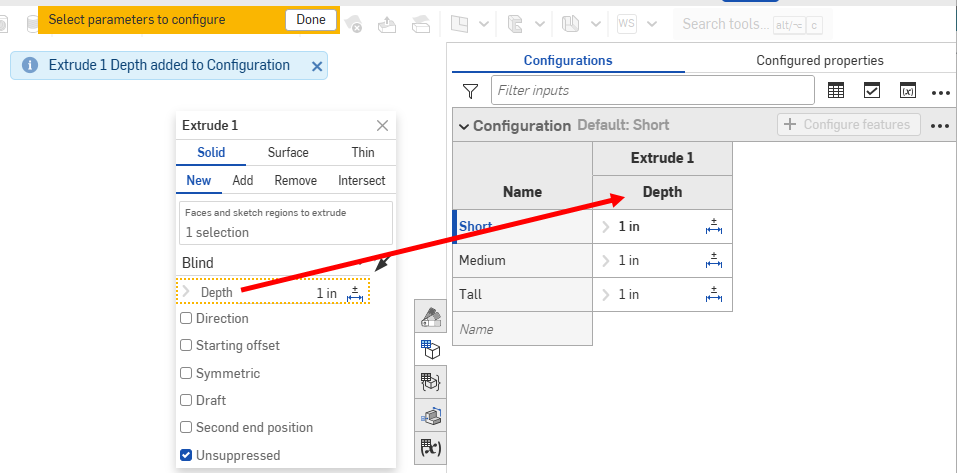
One configuration table can drive a family from the same feature definition. Source: Onshape Part Studio and Assembly Configurations.
That shared recipe is the benefit. Change the mounting-hole rule once and every supported size can inherit it. Fix a drawing note once and the family can stay aligned. Insert the chosen variant into an assembly without maintaining a folder full of nearly identical models.
It is also the risk. A failed feature, renamed reference, or careless suppression rule can damage several released variants at once. The more combinations the model permits, the larger the test surface becomes.
Choose by product identity, not by visual similarity#
Two parts can look nearly identical and still deserve separate files. Two parts can look very different and still be valid configurations of one controlled family. Shape is evidence, but ownership and release behaviour decide the structure.
| Question | Keep as configurations | Split into separate files |
|---|---|---|
| Design intent | Same driving relationships and interface logic | Different requirements or incompatible modeling logic |
| Topology | Features vary predictably by dimension or suppression | Variants need unrelated feature order, references, or manufacturing construction |
| Ownership | Same team changes and approves the family | Different teams or suppliers control the variants |
| Release | Variants can be identified and revised safely inside the native system | Each item needs an unmistakably independent lifecycle |
| Reuse | Assemblies select a known variant from the family | Downstream systems expect independent documents or item records |
| Handoff | Recipient uses compatible native configuration data | Recipient gets one neutral solid, drawing, or supplier-owned model |
Do not make the file count carry information that belongs in a part number, revision, or release record. Equally, do not hide three independently owned products behind one dropdown because their first five features happen to match.
The direct-versus-parametric guide asks which modeling method makes the expected change safer. The configuration decision adds a second question: should those expected changes continue to share one master definition?
One family works when the recipe stays coherent#
A configured family is a good fit when the important relationships remain the same across every variant. A mounting bracket in three widths may share the same datums, hole pattern rule, material thickness, manufacturing process, drawing scheme, and inspection method. The width, bolt spacing, and one optional cable slot can be controlled inputs instead of three hand-edited copies.
The strongest families have a narrow public interface:
- a small set of named inputs with units and permitted ranges;
- clear defaults that create a valid, ordinary member of the family;
- configuration-specific properties where identity really changes;
- visibility rules that prevent impossible combinations;
- feature logic that rebuilds for the whole supported range;
- a defined validation matrix for released combinations.
The weak version is a control panel with twenty checkboxes and no idea which combinations are legal. Five independent binary inputs create 32 possible states. Ten create 1,024. Nobody is opening 1,024 models before lunch, so most of that apparent flexibility is untested theatre.
Onshape's official video shows configuration parameters being generated and managed in a table. Source: Onshape on YouTube.
Prefer named list rows for approved variants when the product really has a catalogue. Use free variables only when a continuous range is intentional and the geometry can be checked across that range. A configurable model should describe what engineering supports, not every value the dialog accepts.
A part number is a decision about identity#
The most useful dividing line is whether a change creates a different item.
Onshape's Configured Properties documentation, also updated 15 October 2026, allows part number, material, appearance, and custom properties to vary by configuration. Its example assigns different part numbers to configuration results. Onshape's release documentation goes further: it treats each included configuration as a unique revisionable object and releases only the configurations selected for that release candidate.
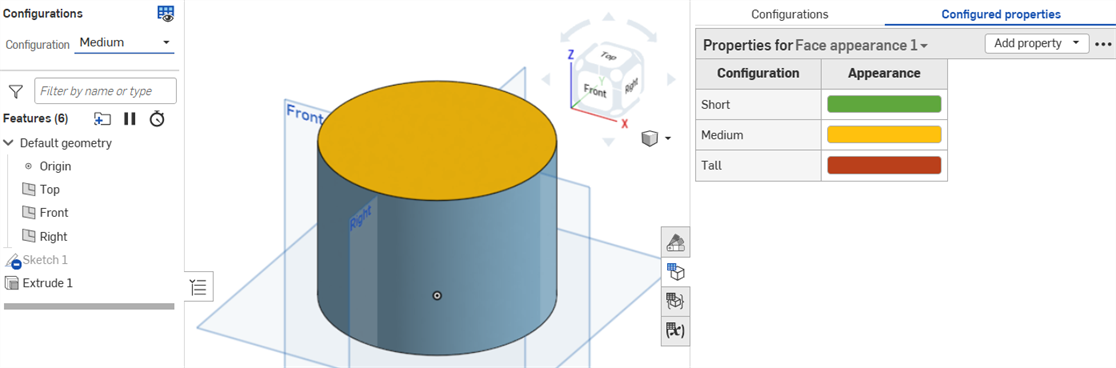
Configuration-specific properties can give family members distinct controlled identities. Source: Onshape Configured Properties.
That means one native file does not have to mean one orderable item. A disciplined CAD and product-data-management workflow can hold several separately numbered, separately released members in one configured model.
But check the systems around CAD before trusting that structure. Does the PLM connector create the right item record for each configuration? Does the BOM use the configuration-specific part number? Can a drawing revision point to exactly one released state? Can a supplier open the correct variant without changing an input? If any answer is vague, the elegant family may become a release ambiguity.
Separate files are safer when the organisation cannot represent configured items cleanly. That is not a modeling failure. It is respecting the weakest system in the handoff.
Not every model state is a new part#
The opposite mistake is assigning a new identity to every geometric state.
Onshape's configured-properties guidance uses a spring as the example. Diameter changes the part identity, while compression height changes the displayed geometry but not the physical spring. The compression input can be excluded from configured properties, so compressed and uncompressed states remain the same BOM and release item.
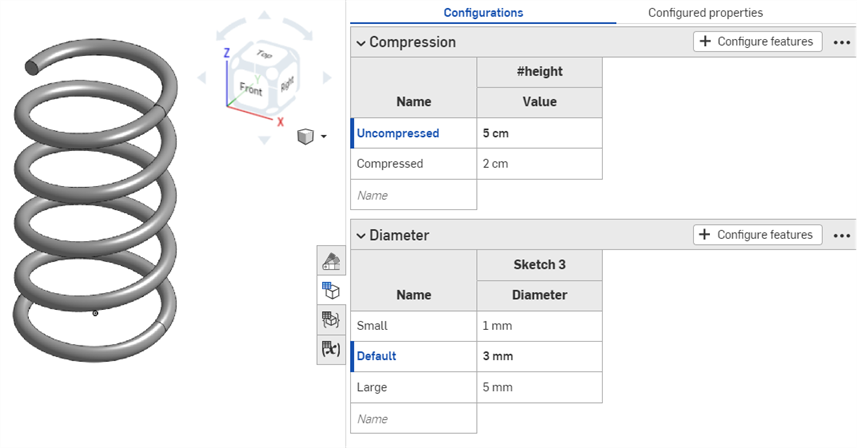
The spring can change state without becoming a different part. Source: Onshape Configured Properties.
Use that distinction beyond springs. An assembly shown open and closed, a mechanism at two positions, a simplified loading state, or a component with cosmetic display suppressed may still be one item. A different material, mounting interface, rated size, or manufactured feature is more likely to need a distinct identity.
Ask what the warehouse, buyer, machinist, inspector, and service technician would receive. If they need to distinguish two objects, the release data needs two identities. If the geometry only shows two states of the same object, multiplying part numbers creates confusion rather than control.
Split the file when the shared tree starts lying#
Configurations should share real design intent, not merely a historical accident.
Suppose a small enclosure is machined from aluminium, the medium one is bent sheet, and the large one is welded. They may serve the same product role, but their features, datums, tolerances, manufacturing drawings, and revision pressures are different. Forcing them into one tree produces suppression logic that reads like tax law and breaks whenever somebody touches an early feature.
Split a family when:
- one variant needs a different manufacturing method or datum strategy;
- topological changes make downstream references unstable;
- different teams or suppliers own the designs;
- one member changes frequently while the others must remain frozen;
- different software versions, templates, standards, or approval routes apply;
- the native system cannot release, compare, or audit each configured item safely;
- the recipient cannot consume the configuration definition.
A little duplication can be cheaper than a clever dependency. The point is not to eliminate repeated geometry at any cost. It is to avoid repeated decisions while keeping failures contained.
Assemblies multiply configuration mistakes#
Part configurations become assembly inputs, and assembly configurations can then change component variants, suppression, mates, patterns, or assembly features. This is useful for a product line with approved motor sizes, guard options, and handed assemblies. It is also how a tidy table becomes a dependency cupboard.
Onshape's assembly configuration workflow lets an assembly instance reference a selected part configuration and later change that reference. SOLIDWORKS documents assembly configurations that vary components, component configurations, dimensions, features, and configuration-specific properties.
Onshape's official workflow demonstrates configuring assembly parameters and editing the table outside the model. Source: Onshape on YouTube.
Validate from the top-level use case. A part can rebuild correctly by itself while the selected assembly variant has the wrong mate, outdated fastener, invalid clearance, stale drawing, or mismatched BOM row. Run the assembly interference workflow on the exact released configuration, not whichever state was last open on the designer's screen.
Neutral files collapse the family to one result#
Native configuration intelligence usually does not survive a neutral export. STEP or Parasolid can carry the selected body's precise geometry, but not the original configuration table, feature suppression rules, named inputs, or every application-specific property. A mesh carries even less design intent.
Use the CAD file-format guide before promising a configurable family to another system. If the recipient needs three variants, export three explicitly named and revision-controlled results. Include the drawing or PMI required to identify each one. Reopen every export and verify that the file contains the intended configuration.
Do not send bracket.step three times and trust an email subject line to preserve identity. Put the part number and revision in the controlled package, and keep the native source configuration mapped to the delivered file.
Moving from one family to separate files#
Splitting a configured model is a migration, not a Save As spree.
SOLIDWORKS 2026 includes a documented Splitting Out Configurations Into Individual Files workflow and can update where-used references after the split. Whether the CAD system automates that work or not, the engineering checks remain the same:
- Freeze and record the source model, configuration name, part number, and revision.
- Create one controlled destination for each item that needs independent ownership.
- Preserve the intended geometry, material, mass properties, custom properties, datums, and drawing references.
- Update assembly, drawing, CAM, simulation, and PLM references deliberately.
- Compare each new file with its source configuration using geometry and critical-interface checks.
- Mark the old family definition so nobody quietly continues releasing from both structures.
- Keep a migration map with the engineering revision.
The reverse move needs the same care. Combining separate files into a master family can erase individual history or create new cross-variant dependencies. Build the family because the products truly share a recipe, not because the folder looks untidy.
A release check for configurable families#
Before releasing a configured part or assembly, check the model as a family and as an item:
- confirm the supported input combinations and reject impossible ones;
- rebuild every released configuration from a clean state;
- verify configuration-specific part number, description, material, finish, and mass;
- open each drawing and confirm its model state, dimensions, BOM, and title-block properties;
- test assembly references, mates, clearances, and suppressed components;
- export and reopen every required manufacturing file;
- record which configurations were released and which remain working states;
- confirm the PLM, supplier, and inspection workflow identify the same item and revision.
The CAD version-control guide still applies. A configuration is not a revision, and a dropdown is not an approval workflow. The model can contain many possible states while the release must point to one exact, reviewed result.
Keep variants together when one recipe makes their relationship clearer and safer. Split them when separate ownership makes change and release clearer and safer. If the team cannot tell which part, configuration, and revision is on the shop floor without opening the master model and squinting at a table, the structure has already chosen complexity over control.
Related articles
CAD Workflows
Direct vs parametric modeling: choose for the change
Use direct modeling for local edits to imported geometry, fast concepts, and changes whose intent is obvious from the existing faces. Use parametric modeling when dimensions, relationships, configurations, drawings, and future revisions must update predictably; most production workflows benefit from mixing both deliberately.
CAD Workflows
CAD version control: versions, revisions, and releases
CAD version control should preserve every useful design state while reserving revision labels for approved changes. Release one traceable package of the native model, drawing, BOM, and required exports so manufacturing can identify exactly what was approved.
CAD Workflows
Large CAD assemblies: make them faster without losing trust
Speed up a large CAD assembly by measuring which work is slow, reducing unnecessary mate solving and feature regeneration, and using task-specific lightweight or simplified representations. Keep the full released model authoritative, and restore it for interference, mass, drawing, export, and manufacturing checks.
Newsletter
Get new CAD articles in your inbox
Text-to-CAD guides, new tools, CAD comparisons, and practical tutorials.