

CAD version control: versions, revisions, and releases
A saved CAD version is not automatically an approved revision. Separate design history from release status, then make the model, drawing, BOM, and export point to the same decision.
Quick answer
CAD version control should preserve every useful design state while reserving revision labels for approved changes. Release one traceable package of the native model, drawing, BOM, and required exports so manufacturing can identify exactly what was approved.
Picture the handoff at 4:55 on Friday. The drawing says Rev C. The STEP file is called bracket-final-2.step. A supplier is waiting on the phone, the old PDF is still open on a second monitor, and somebody has just noticed that the slot moved 3 mm in the CAD model.
That mess is not solved by saving more often. CAD version control needs three separate ideas: working history for every useful change, named versions for intentional checkpoints, and an approved engineering revision for manufacturing. Product data management can enforce that separation, but the practical rule is simpler: release one exact package, give it one status, and make every derivative file traceable back to it.
This is a source-based workflow guide, not a test of a particular PDM installation. I have not audited a live company's permissions, approval routes, or supplier portal. The examples come from current Onshape and SOLIDWORKS documentation, whose terminology is useful precisely because it shows that a version and a revision are not synonyms.
Save, version, revision, and release are different events#
Teams get into trouble when one word, usually "version," has to describe every state a design can occupy.
| State | What it should mean | Who should care |
|---|---|---|
| Save or history entry | A recoverable working change | The designer doing the work |
| Version | A stable checkpoint that can be opened, compared, or branched | The design team |
| Revision | An approved design identity such as A, B, or C | Engineering, manufacturing, quality, and suppliers |
| Release | The controlled decision and record that makes a revision available for its intended use | Everyone downstream |
Those labels vary between systems, so confirm the local definitions rather than tattooing this table onto the office wall. The underlying separation still matters. SOLIDWORKS PDM 2026 creates a new file version when a file is modified or checked in, while a revision can be assigned when the file reaches an approval state, such as approved for manufacture. Onshape's versioning help, updated September 24, 2026, describes a version as a view-only checkpoint that can be branched into a new workspace.
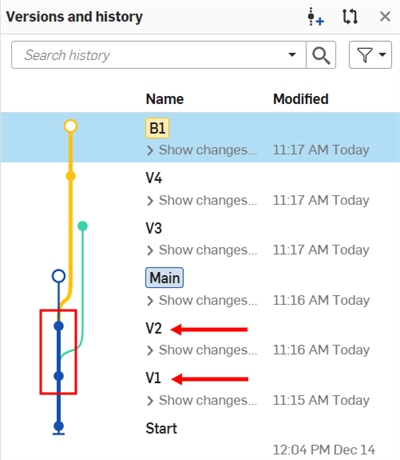
Onshape's help shows named, view-only versions inside the document history. Source: Onshape Versioning and Branching.
A save answers, "Can I get yesterday's work back?" A version answers, "Can the team inspect this checkpoint?" A revision answers, "Which approved design are we talking about?" A release answers, "Who approved it, when, and what exact deliverables went out?"
If final-final-really-final.step is doing all four jobs, the filename has been promoted far beyond its competence.
History is not approval#
Automatic history is excellent insurance. It catches the deleted sketch, the broken mate, and the dimension changed just before lunch. It also produces many states that should never reach a supplier.
Onshape says its built-in PDM captures document edits and supports comparing or restoring earlier states. SOLIDWORKS PDM says checked-in versions can be viewed, retrieved, compared, and restored. Neither description means every captured state is fit for manufacture. A designer can save a half-finished pocket, suppress a fastener for troubleshooting, or open an experimental branch. Recoverable does not mean approved.
Onshape's official short video shows history capture from the start of a model. It demonstrates the vendor workflow, not a release audit. Source: Onshape on YouTube.
That distinction becomes especially important in assemblies. A top-level assembly can be saved while one subassembly is still changing. A drawing can remain on an older model state. A CAM program can still reference yesterday's geometry. The latest file in each folder may be individually current and collectively wrong.
The release process has to identify a coherent set, not merely the newest timestamp.
Branches protect experiments, not manufacturing#
Branching is useful when two changes should proceed without taking turns. One workspace can explore a lighter bracket while another fixes a mounting interface. A later merge can bring selected work back into the main design.
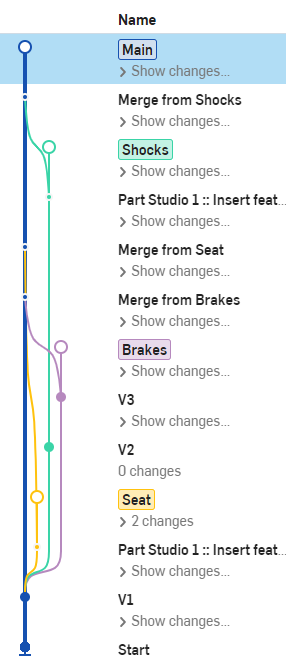
Onshape's branching example shows independent workspaces returning to the main line. Source: Onshape Versioning and Branching.
The trap is treating "merged to main" as "released." A merge says which design changes were combined. It does not prove that the drawing was updated, the BOM was checked, the STEP export was regenerated, or the approver accepted the result.
Onshape's official webinar explains versions, branches, comparisons, and merges. The interface has evolved, so use the current help page for exact controls. Source: Onshape on YouTube.
The branch is where work happens. The release is where responsibility becomes explicit. Confusing them is like assuming a clean workbench means the part passed inspection. It looks encouraging from the doorway and proves almost nothing.
A release should freeze the whole handoff#
Onshape Release Management, also updated September 24, describes automated workflows for releasing revisions of parts, assemblies, drawings, and imported files. Its PDM overview describes release packages that can include parts, assemblies, and drawings. The important word is package.
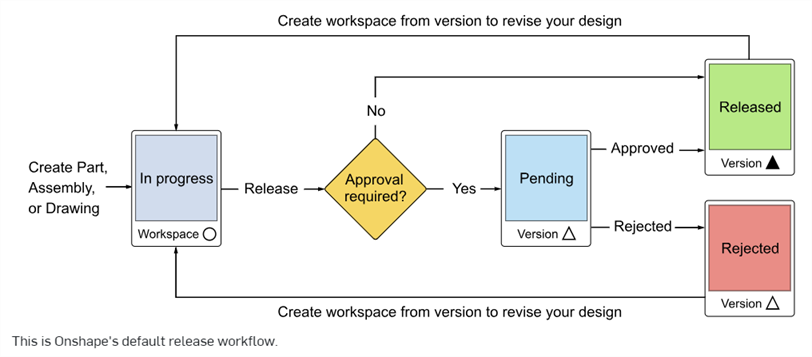
Onshape's default workflow separates review states from released and obsolete results. Source: Onshape Release Management.
For a machined part, the package might contain the native model, an approved drawing, a STEP AP242 file, the BOM row or assembly context, and any released manufacturing data. For a sheet-metal part, add the controlled flat pattern and bend information. For a printed fixture, the mesh may be a manufacturing derivative, but the editable CAD model should remain the authority.
Each file needs enough identity to answer four questions:
- Which part number and revision does this file represent?
- Which source model and version produced it?
- When was it generated, checked, and approved?
- Has a newer release made it obsolete?
The answer does not have to be crammed into a 140-character filename. In a PDM system, metadata and workflow state can carry most of it. Outside PDM, a controlled release register, read-only package, and disciplined naming scheme can still beat a shared folder full of optimistic adjectives.
Derived files are where control quietly breaks#
Native CAD, drawings, neutral exports, meshes, and CAM output do not all update themselves together. Our CAD file-format guide explains what the formats preserve. The version-control consequence is that every export creates another object that can drift away from its source.
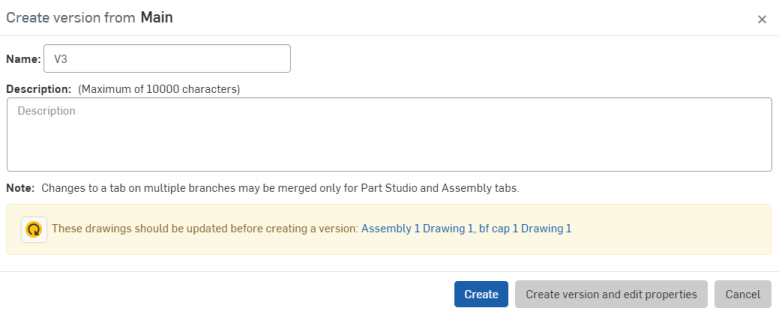
Onshape warns when drawings need updating before a version is created. That dependency check is exactly the sort of friction a release needs. Source: Onshape Versioning and Branching.
Suppose Rev B moves a hole from 18 mm to 21 mm from the edge. The native model changes first. The drawing view may update but keep an old dimension arrangement. The STEP file on the supplier portal does nothing. A CAM setup may flag a stale toolpath, or it may keep running against a copied body. The release is correct only when the whole chain points to the same approved geometry.
A checksum can prove that a file has not changed since it was issued. It cannot prove that the right file was issued. That decision still needs an owner and a recorded review.
A small team can run a serious release without buying a cathedral#
A full PDM deployment is useful when references, permissions, approvals, and reuse have outgrown folders. A two-person shop can still adopt the important controls before it adopts the software.
Use this minimum workflow:
- Keep one authoritative editable model. Do not let exports become accidental masters.
- Save freely during design, but name only meaningful checkpoints that another person could review.
- Record the proposed change and its reason. "Hole moved 3 mm for socket clearance" is useful. "Updated model" is not.
- Review the model, drawing, BOM, and manufacturing derivatives together. Check units, material, finish, tolerances, references, and revision fields.
- Approve one immutable package and assign its engineering revision. Do not overwrite that package after approval.
- Deliver from the released package, not from a designer's working folder or Downloads directory.
- When the next change begins, copy or branch from the released state and make the previous release visibly obsolete only after the replacement is approved.
Permissions should match the job. Designers need room to experiment. Approvers need a clear review state. Suppliers usually need the released package, not the live workshop floor of every unfinished change.
Common failures are boring and expensive#
The most dangerous version-control failures rarely look technical. They look like ordinary office habits:
- A drawing revision changes but the STEP file is not regenerated.
- A supplier receives an attachment from an old email thread after a new release exists.
- A copied assembly loses references and silently points at local files.
- Someone retrieves the latest version when the job requires the latest approved revision.
- A branch is merged, but downstream drawings and CAM data are never reviewed again.
- A revision is rolled back without preserving the later history or recording why.
- Two part revisions share one unchanged filename, and the receiver has no metadata to separate them.
These failures are why PDM feels bureaucratic right up until the first expensive scrap part. The answer is not maximum ceremony. It is enough traceability that the machinist, buyer, inspector, and designer all name the same design state without a forensic investigation.
Choose the control level from the consequence#
For solo concept work, automatic history and named milestones may be enough. For a team editing linked assemblies, use a system that understands references, ownership, and parallel changes. Once files cross into purchasing, inspection, regulated records, or production, add an approval workflow and immutable released packages.
Onshape and SOLIDWORKS PDM implement these ideas differently. Onshape keeps history, versions, branches, and releases in its cloud document model. SOLIDWORKS PDM uses vault versions, check-in and check-out, workflow states, and revisions. The product choice matters, but the naming discipline matters first. A team that calls every save a revision will carry the same confusion into expensive software.
The Friday-afternoon test is wonderfully unromantic. Ask which revision is approved, open the exact package, and trace every drawing and export back to its model. If the answer depends on who remembers sending the last email, version control has not reached the part yet.
Related articles
Text-to-CAD
Can text-to-CAD generate engineering drawings?
Text-to-CAD can contribute to an engineering drawing when it works inside a CAD system with drawing automation, but it does not turn a prompt into a trustworthy released drawing by itself. As of October 2026, SOLIDWORKS documents AI-assisted drawing generation and Onshape can replicate existing annotations; the engineer still owns datums, tolerances, manufacturing notes, and approval.
CAD Workflows
Text-to-CAD file formats: STEP, Parasolid, STL, 3MF, and more
Use the native CAD file when both people use the same system, Parasolid when both systems share that kernel, and STEP AP242 for the safest neutral engineering handoff. Use 3MF for printing, glTF or GLB for browser review, and DXF for flat 2D profiles.
CAD Workflows
Onshape CAM Studio in 2026: what reaches the CNC machine?
Onshape CAM Studio can program 2.5-axis and 3-axis milling inside the same document as the CAD model, then simulate the job and post G-code for a CNC machine. It is still labelled beta on Onshape's feature page, and teams should qualify the exact machine, postprocessor, datum, workholding, and revision workflow before production use.
Newsletter
Get new CAD articles in your inbox
Text-to-CAD guides, new tools, CAD comparisons, and practical tutorials.