

Scan to CAD: rebuild the design, not every triangle
A 3D scan records the part that exists, including wear, noise, and manufacturing variation. Editable CAD comes from deciding which surfaces are functional, rebuilding their design intent, and checking the new model back against the scan.
Quick answer
Turn a 3D scan into editable CAD by cleaning and aligning the scan, identifying functional planes, axes, sections, and freeform regions, then rebuilding those features as native sketches, surfaces, and solids. Use direct mesh conversion only when its faceted or automatically fitted result suits the downstream job, and verify the rebuilt model with deviation analysis plus separate checks of critical interfaces.
The old pump bracket is on the desk beside the calipers. Its paint is chipped, one mounting ear has been filed by somebody with more urgency than restraint, and the scan on the second monitor looks wonderfully complete. Millions of measured points describe every dent and wobble. The cold coffee beside the mouse is less impressed.
Do not make every triangle solid and call the job finished. Clean and align the scan, decide which planes, axes, holes, sections, and freeform regions carry the part's function, then rebuild those as native CAD features. Finish with deviation analysis against the scan and separate checks of the critical interfaces. The aim is an editable model that explains the design, not a heavier copy of the scanner's evidence.
This is a source-based workflow using Autodesk Fusion and SOLIDWORKS Design 2026 documentation plus original training videos from MLC CAD Systems. I did not scan, fit, manufacture, or inspect the bracket described here. No accuracy, timing, or scanner-performance claim in this guide comes from a test I performed.
A scan records the object, not its design intent#
A scanner may begin with a point cloud, a collection of measured 3D coordinates. Processing normally connects or reconstructs those samples into a mesh so software can display a continuous-looking skin. Neither representation knows that one patch is a mounting plane, one cylinder is a bearing seat, or one ragged hole should have been 10 mm before years of use made it oval.
Autodesk's point-cloud documentation defines the input as a large collection of points placed in a 3D coordinate system. SOLIDWORKS Design 2026 then describes the next engineering work: prepare the mesh, create sections or surfaces, refine those against the scan, knit the surfaces, and create the solid.
That sequence matters because the physical sample contains several truths at once:
- the intended nominal shape;
- manufacturing variation from when it was made;
- wear, damage, coatings, dirt, and deformation accumulated since;
- scanner noise, occluded regions, alignment error, and meshing choices.
A clean CAD cylinder fitted through a noisy bore is an interpretation of those truths. It may be the right interpretation, but the software cannot infer the original tolerance, the datum scheme, or whether the worn sample should be copied exactly.
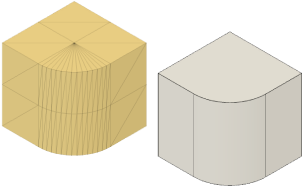
Fusion can convert a prepared mesh into a solid or surface body. Conversion changes the representation; it does not recover the original feature history or requirements. Source: Autodesk Fusion Help.
Decide what the new model has to do#
"Make CAD from this scan" is not a usable acceptance criterion. Choose the downstream job before choosing the conversion method.
| Downstream job | Model that may be enough | Evidence still required |
|---|---|---|
| Visual reference or packaging envelope | Cleaned mesh or lightweight surface | Scale, orientation, missing regions, and envelope check |
| Design a mating component | Scan reference plus rebuilt interface planes, axes, and clearances | Datum alignment and critical-interface measurements |
| Manufacture a replacement part | Editable solid with nominal features and a controlled drawing or PMI | Material, tolerances, fits, process, and inspection plan |
| Preserve an organic exterior | Fitted surface or organic conversion | Surface deviation, continuity, thickness, and downstream edit test |
| Recover a machined part | Prismatic features rebuilt from planes, cylinders, sections, and patterns | Feature size, position, relationships, and deviation at critical regions |
A faceted solid can be perfectly adequate for subtracting a scanned handle shape from a foam fixture. It is a poor master model for a pump bracket whose hole spacing, shaft axis, and mounting face will change in the next design revision.
The B-Rep versus mesh guide explains the representation difference. This guide adds the decision the converter cannot make: which geometry should remain measured evidence and which geometry should become controlled design intent.
Clean and align before fitting features#
Start with the least glamorous part. Remove isolated points, obvious table or fixture geometry, duplicate shells, spikes, and holes caused by missed sight lines. Preserve an untouched scan as the reference and make cleanup on a working copy. Aggressive smoothing or decimation can make the file pleasant while erasing the edge break or shallow pocket you needed.
Alignment is just as important. Place the scan in a coordinate system based on functional geometry, not the arbitrary scanner origin. For a bracket, that might mean:
- Fit the primary mounting plane and use it as the base datum.
- Fit a bearing or shaft cylinder to establish an axis.
- Use a secondary plane, hole pattern, or centre plane to stop rotation.
- Check residuals and the physical part before treating those fitted entities as authority.
Do not fit one global plane through a surface that is meant to contain separate machined pads. Do not average a damaged boss into the datum because it contributes many convenient points. Crop and segment the evidence according to how the part locates and functions.
MLC CAD Systems demonstrates importing, cleaning, orienting, and reducing scan data before feature reconstruction. Source: MLC CAD Systems on YouTube.
Direct conversion is one route, not the whole workflow#
Fusion's Convert Mesh documentation separates faceted, prismatic, and organic methods. Each produces a body, but they solve different problems.
Faceted conversion creates one solid or surface face for each mesh face. That preserves the tessellated boundary closely and can support booleans or local fixture work. It also turns every triangle into CAD topology. A smooth-looking cylinder may arrive as hundreds of planar faces, with no single radius to edit and no hole feature to move.
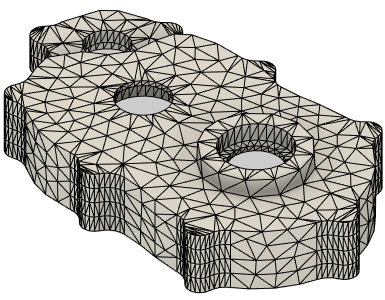
The Faceted method creates a corresponding face on the converted body for each mesh face. The result is a valid body, but its topology still follows the triangles. Source: Autodesk Fusion Help.
Prismatic conversion uses mesh face groups to infer and merge planar, cylindrical, and other mechanical regions. Autodesk recommends repairing the mesh and building logical face groups before conversion. That can produce a much cleaner body for originally prismatic geometry.
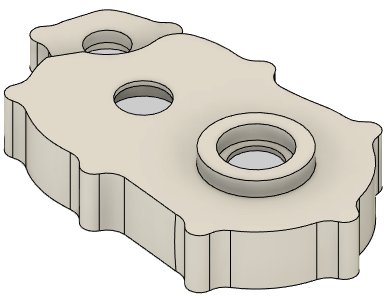
The Prismatic method merges groups of facets into singular faces inferred from the mesh groups. Check every fitted feature rather than assuming the cleaner topology is the original nominal design. Source: Autodesk Fusion Help.
Organic conversion targets scanned or freeform shapes and can create a smoother solid or surface at a chosen resolution. Autodesk labels the capability as part of the Fusion Design Extension and notes that higher accuracy costs more processing time. A smoother body can be easier to handle, but it is still an approximation selected by an algorithm and a resolution setting.
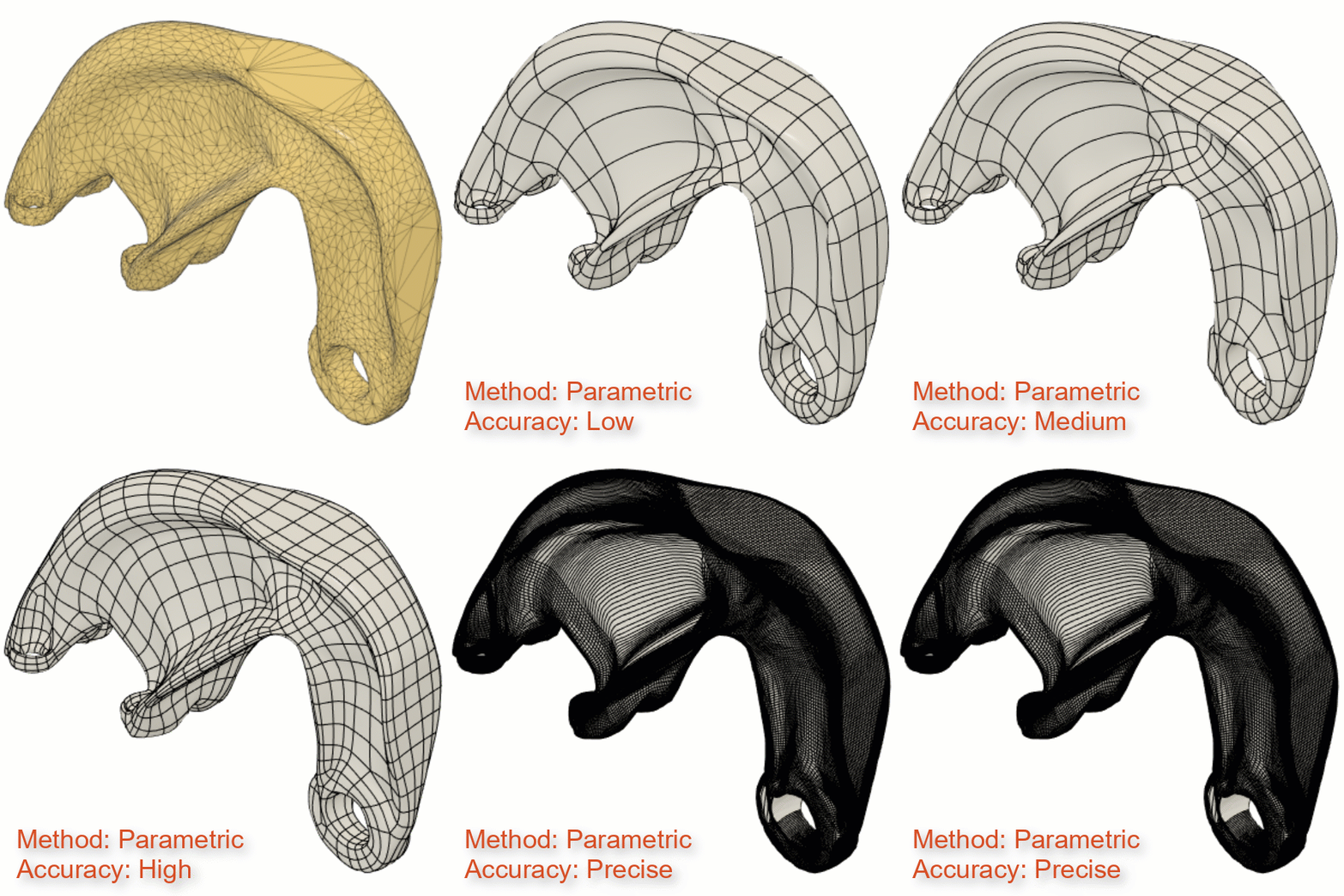
Fusion's Organic method can create a smoother body from scan or freeform mesh data and retain a conversion feature in the timeline. It does not turn the result into the original sketches and manufacturing features. Source: Autodesk Fusion Help.
Use direct conversion when the resulting topology matches the next job. Do not confuse a timeline entry named Convert Mesh with a recovered parametric recipe. The feature records the conversion operation, not why the original designer chose the hole pitch or wall thickness.
Rebuild analytical parts from sections and relationships#
For a machined or fabricated part, the more editable route is often to use the scan as a reference and build the CAD again.
SOLIDWORKS documents two ScanTo3D approaches. Guided surface creation works well for mostly analytical shapes, while automatic creation suits more organic forms. Its semi-manual workflow sections the mesh, sketches 2D and 3D curves, builds surfaces, measures deviation, then trims and knits the surfaces into a solid.
For the pump bracket, I would treat the geometry in layers:
- establish the mounting plane and shaft axis from selected scan regions;
- fit the hole centres, then replace noisy circular boundaries with controlled hole features;
- use several section curves to recover the outer cast or forged envelope;
- rebuild ribs, bosses, pads, and pockets from their likely functional relationships;
- add fillets after the parent faces are stable;
- dimension the feature spacing from functional datums rather than from one worn edge.
That is reverse engineering, not forensic certainty. If only one used sample exists, you cannot know from geometry alone whether a 24.87 mm boss began life at 25 mm, was intentionally 24.8 mm, or was machined out of position. Use drawings, mating parts, standard sizes, undamaged repeated features, inspection data, and engineering judgement to bound the decision.
MLC CAD Systems works from a scanned pump-bracket problem through reference geometry and feature reconstruction in SOLIDWORKS. Source: MLC CAD Systems on YouTube.
Organic surfaces need a different kind of honesty#
An ergonomic grip, clay body, casting, or worn historical component may not have an obvious set of extrudes and revolves. For those shapes, fit or rebuild a smaller network of surfaces that captures the important form without tracing every bump.
Use sections in several directions, silhouette curves, symmetry, curvature displays, and continuity checks. Keep the number of patches low enough that the surface can still be edited. The surface-versus-solid guide covers the later step: close or thicken the skin, then validate wall thickness, interfaces, and manufacturing requirements as a solid.
Overfitting is the quiet failure. A dense fitted surface can reproduce scanner noise so faithfully that reflections wobble and later edits become miserable. A looser surface may be more useful when the aim is the original design character rather than the scratches on one sample. Record which regions were fitted tightly, which were smoothed, and which were reconstructed from symmetry or other assumptions.
Deviation is evidence, not automatic acceptance#
SOLIDWORKS Design 2026's Deviation Analysis compares a mesh with fitted surfaces or curves, or compares one mesh with another. It displays signed colour bands, allows upper and lower bounds, reports values at sampled locations, and can save a detailed report.
Use it throughout the rebuild, not only as a final screenshot:
- Compare the cleaned working mesh with the untouched reference to expose damage from decimation or smoothing.
- Compare fitted planes, cylinders, curves, and surfaces with the selected scan regions.
- Tighten or relax the fit according to the function of each region.
- Save a final map and numerical report with the scan, CAD revision, alignment method, and chosen bounds.
A mostly green map proves only that the compared entities fall inside the displayed bounds under that alignment. It does not prove scanner calibration, measurement uncertainty, correct datums, acceptable manufacturing tolerance, or recovery of the nominal design. A colour scale can be made calming simply by widening it, which is an impressive way to solve no engineering problem at all.
Use tighter acceptance around bearing seats, sealing faces, mounting holes, and mating envelopes when their requirements justify it. A broad cosmetic surface may tolerate a different fit. State the limits before reviewing the colours, and inspect local maxima rather than hiding them in a whole-part average.
Common failures and what they mean#
The failure mode usually tells you which representation or assumption is wrong.
| Failure | Likely cause | Better response |
|---|---|---|
| Converted body has thousands of tiny faces | Faceted conversion preserved mesh topology | Rebuild critical regions or use prismatic face groups |
| A watertight conversion becomes only surfaces | Mesh still has openings or invalid regions | Repair the mesh, then stitch or patch intentionally |
| Hole diameters vary along their depth | Noise, wear, poor view angle, or misalignment | Fit a controlled cylinder from a justified region and inspect the sample |
| Smooth organic surface looks lumpy | Fit follows noise or patch network is too dense | Reduce control density and review sections and curvature |
| Rebuilt model matches globally but misses mounting faces | Alignment favoured the whole shape over functional datums | Align and judge by the interfaces that control use |
| STEP export looks clean but cannot be edited as intended | Neutral file carried final B-Rep, not the native recipe | Deliver native CAD when feature history is required and permitted |
The imported STEP repair workflow starts after exact CAD translation. Scan-to-CAD starts earlier, with measured geometry whose nominal intent may never have been captured. Do not apply the same certainty to both.
Release the scan, model, and assumptions together#
A reviewable package should make it possible to separate measurement from interpretation.
- untouched scan or point cloud, including units and capture notes;
- cleaned and aligned working mesh;
- alignment datums and the regions used to fit them;
- native CAD model with named sketches, features, and fitted surfaces;
- neutral export required by the receiving workflow;
- deviation report with bounds, sampling settings, and model revision;
- list of reconstructed, mirrored, smoothed, or otherwise inferred regions;
- controlled drawing or PMI for critical dimensions, fits, tolerances, materials, and finishes;
- inspection plan for the replacement part or mating component.
Reopen the issued neutral file and confirm units, body type, coordinate system, analytic faces, and critical measurements. If editability matters, open the native file in the intended CAD version and change a driving value. A body that merely survives export is not automatically a maintainable design.
The useful result is not the body with the smallest whole-part colour error. It is the model whose functional surfaces are controlled, whose freeform regions are fitted with declared judgement, and whose uncertainty remains visible. Copy the part when the part itself is the requirement. Rebuild the design when somebody has to understand, revise, manufacture, or inspect it next year.
Related articles
Text-to-CAD
B-Rep vs mesh in AI generation: why it matters
B-Rep (Boundary Representation) output from text-to-CAD tools contains mathematically exact surfaces, edges, and faces that can be filleted, chamfered, dimensioned, and manufactured. Mesh output (STL/OBJ) is a triangle approximation with no edge or face information, unsuitable for engineering edits or precision manufacturing.
CAD Workflows
Imported STEP file errors: repair, re-export, or rebuild?
Repair an imported STEP file when the fault is local and the intended shape is unambiguous. Request a better export when faults repeat across the model, and rebuild only when missing design intent or widespread bad topology makes repair less trustworthy than remodeling.
CAD Workflows
Direct vs parametric modeling: choose for the change
Use direct modeling for local edits to imported geometry, fast concepts, and changes whose intent is obvious from the existing faces. Use parametric modeling when dimensions, relationships, configurations, drawings, and future revisions must update predictably; most production workflows benefit from mixing both deliberately.
Newsletter
Get new CAD articles in your inbox
Text-to-CAD guides, new tools, CAD comparisons, and practical tutorials.