

Onshape CAM Studio in 2026: what reaches the CNC machine?
Onshape now keeps CAD, CNC toolpaths, simulation, and manufacturing revisions in one cloud document. The useful part is the handoff; the dangerous part is assuming integration has already qualified the post and machine.
Quick answer
Onshape CAM Studio can program 2.5-axis and 3-axis milling inside the same document as the CAD model, then simulate the job and post G-code for a CNC machine. It is still labelled beta on Onshape's feature page, and teams should qualify the exact machine, postprocessor, datum, workholding, and revision workflow before production use.
It is 4:40 on Friday, Rev B has moved a pocket by 3 mm, and the programmer has yesterday's toolpath glowing on a second monitor. The setup sheet is already on the bench. Someone near the machine is waiting with one hand uncomfortably close to Cycle Start, while the coffee beside the keyboard has achieved room temperature.
That is the problem Onshape CAM Studio is trying to remove. It puts computer-aided manufacturing in the same cloud document as the CAD model, with toolpaths, machine simulation, versions, branches, and released manufacturing data beside the geometry. As of October 4, 2026, the ordinary CAM Studio offering covers 2.5-axis and 3-axis machining. It can post G-code for a machine, but the integration does not prove that the selected datum, tool library, fixture, or postprocessor is correct.
This is a source-based review of Onshape's public feature page, help, release notes, and manufacturing tech tips. I did not cut a test part, time a toolpath calculation, or validate code on a physical controller. That boundary matters more here than it does in most software articles. Bad word processing ruins a paragraph. Bad NC code can ruin a spindle.
What Onshape says is available#
The CAM Studio help page, last updated September 24, 2026, says CAM Studio is included with Onshape Professional or above and provides basic strategies for 2.5-axis and 3-axis machining. It describes CAM Studio Advanced as adding 4-axis, 3+2-axis, and 5-axis work.
The public CAM Studio feature page, checked October 4, still labels CAM Studio as beta for Professional and Enterprise customers and marks CAM Studio Advanced as "Coming Soon." Those pages do not tell the same availability story. I would treat basic 2.5-axis and 3-axis CAM as the product to evaluate, then ask Onshape to confirm the exact Advanced entitlement and release status before planning a multi-axis job around it.
Onshape's introduction shows the vendor's intended CAD-to-CAM workflow. It is a product demonstration, not an independent machining test. Source: Onshape on YouTube.
The product scope is already more serious than a toolpath preview bolted onto a model viewer. Onshape documents jobs, components, stock, workholding, machines, setups, tools, toolpaths, backplotting, stock verification, machine simulation, and posted output. The useful question is not whether the buttons exist. It is whether the same model revision can travel through those stages without somebody quietly programming the wrong shape.
The same document is the actual feature#
Traditional CAD-to-CAM handoffs often create a small museum of files: the native CAD model, an exported STEP, a CAM project, a post file, and a setup sheet whose filename ends in FINAL_v7. Onshape's pitch is that CAD and CAM stay associated inside one document instead.
Its toolpath change-management guide says a model change can flag affected operations, which can then be regenerated individually or as a setup. Versions can lock toolpaths to a particular geometry state. Branches can hold alternate machining strategies, and release management can control parts, assemblies, drawings, and G-code together.
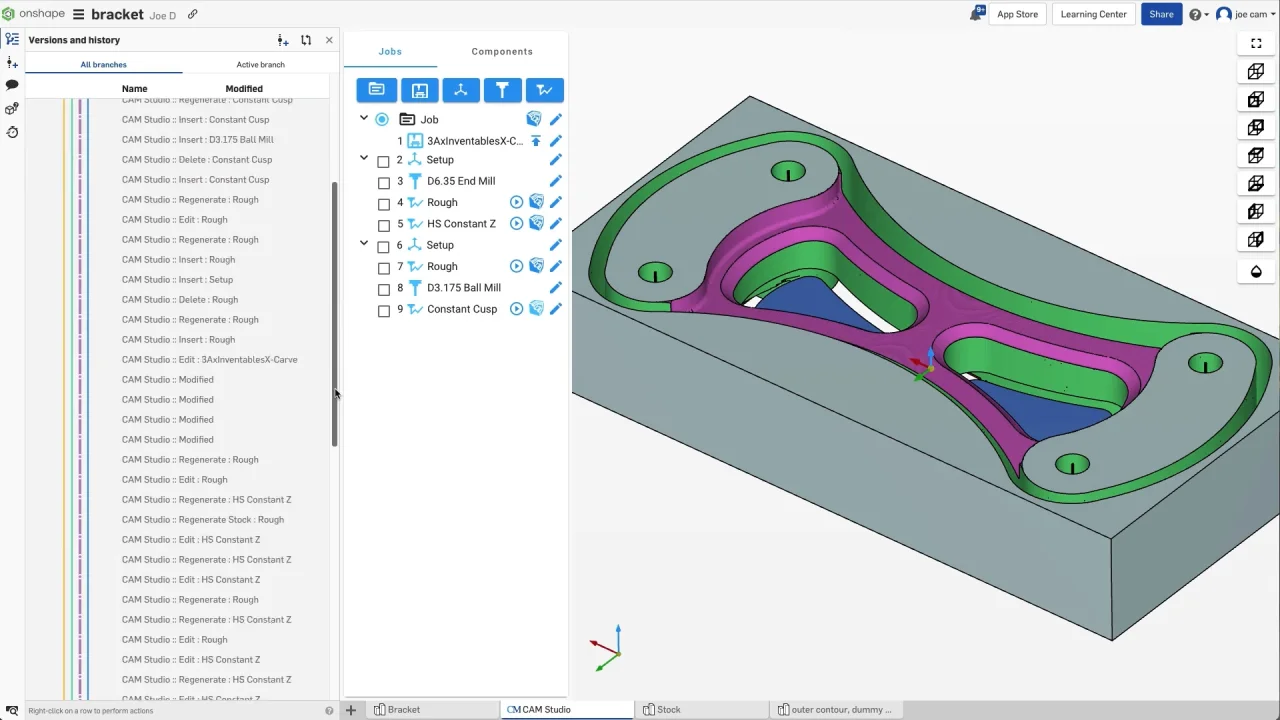
An official Onshape frame shows CAM operations beside the document's version history. It illustrates the data model, not a claim about production reliability. Source: Onshape CAM Studio.
That can remove a particularly stupid failure mode: revising the solid while an exported copy remains the authority for manufacturing. It does not remove engineering judgment. Someone still has to decide which revision is released, which toolpaths need recalculation, and whether a changed pocket has made the vise jaw, tool holder, or inspection plan obsolete.
The advantage is traceability, not magic associativity. A red regeneration marker is useful only if the team treats it as a stop sign rather than a decoration.
The 2026 machining changes fill practical gaps#
Onshape's January 9, 2026 release notes added adaptive cutting options for 2D roughing, 3D roughing, and flatlands in all CAM Studio versions. Onshape says those strategies maintain constant chip load and can reduce cycle time while making motion smoother. Those are vendor claims until they are checked with the material, tool, holder, machine, and feeds a shop actually uses.
The same release added work planes and datums for all users, manual work-coordinate shifts, job-level workholding selection, work-coordinate identifier overrides, and automatic spindle direction based on tool hand. These are not flashy features. They are the parts that decide whether a program is located where the machinist thinks it is.
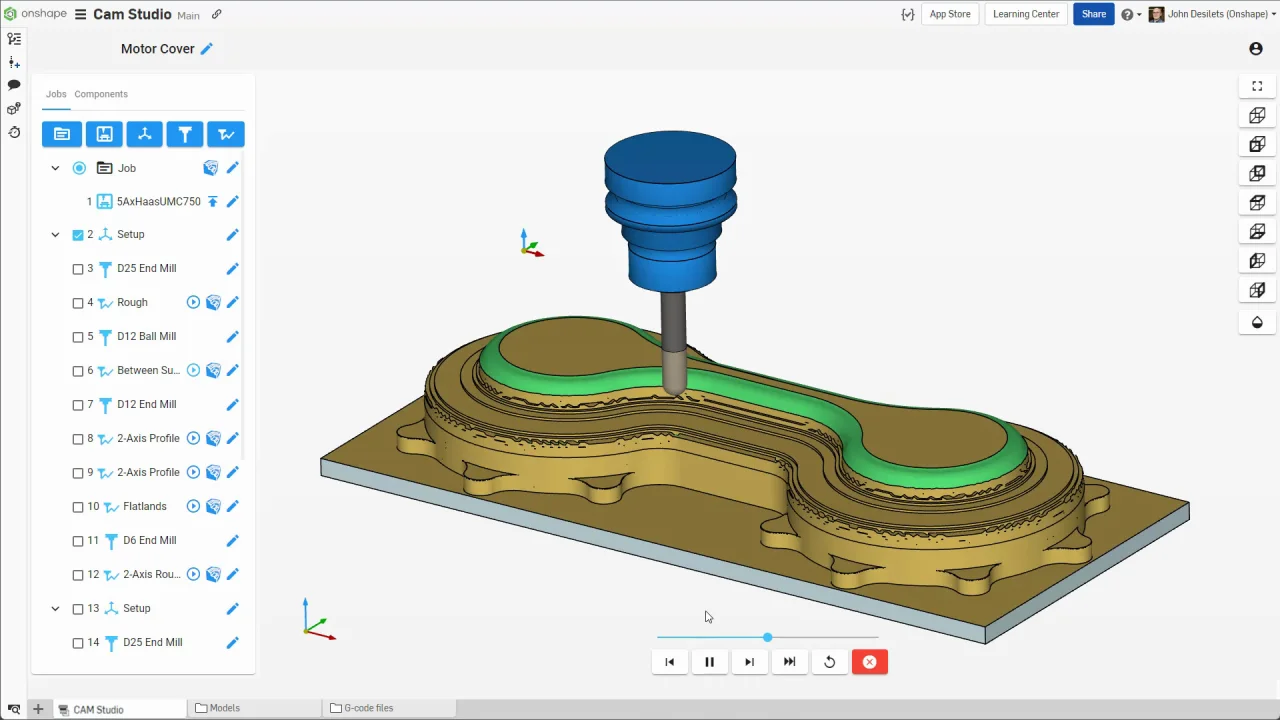
Onshape's official feature-page frame shows a 3-axis machining operation and its job tree. It is vendor interface footage, not a measured cycle-time result. Source: Onshape CAM Studio.
For a new workflow, I would spend less time admiring the adaptive motion and more time checking the work coordinate system. A beautifully calculated path in the wrong coordinate frame is still a crash with better graphics.
Tools and posts are where the promise meets metal#
Onshape's G-code export guide walks through the chain: add the part, stock, and workholding; create a job; choose the stock coordinate system; select a machine; configure the post; define the datum; choose tools and paths; set feeds, speeds, coolant, and comments; then post the setup.
That sequence is worth keeping intact. A CAM path is a geometric plan. A postprocessor converts that plan into the dialect and conventions expected by a particular controller. The Onshape guide uses an M8 coolant command as a simple example. The LinuxCNC language reference shows why a posted file carries more state than a list of XYZ points: units, distance mode, coordinate system, tool offsets, feed mode, spindle state, coolant, and canned cycles can all affect what the machine does.
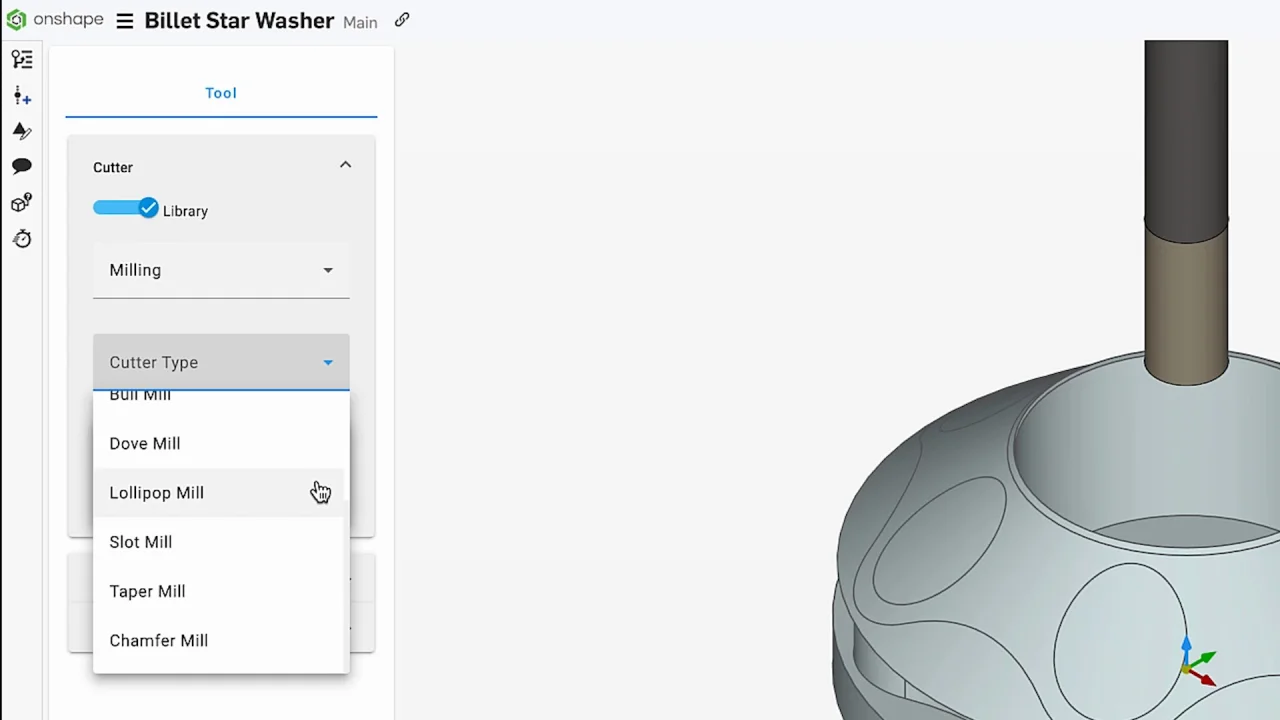
An official Onshape frame shows the custom cutter library. The geometry and holder definition need to match the physical tool assembly used on the machine. Source: Onshape CAM Studio.
This is also where a cloud-native interface stops being the interesting part. The post has to match the controller, the tool number has to match the machine, and the programmed holder has to match the thing in the spindle. A neat tool-library card cannot measure the stick-out on the bench for you.
Backplot, verify, and machine simulation catch different mistakes#
Onshape separates three levels of checking in its simulation guide:
- Backplot animates the path against the finished part. It is useful for entry, exit, retract, depth, and clearance checks, but it does not show stock removal.
- Verify simulates removal from the stock. Onshape says it can reveal gouges, overcuts, pass depth, and possible holder interference with the part.
- Machine simulation adds the machine's kinematics, enclosure, spindle, fixtures, rapid moves, tool changes, and travel limits. Onshape says a detected collision stops the simulation and marks the affected faces.
Use all three because they answer different questions. Backplot can show a ridiculous retract. Verify can show an unwanted bite out of the stock. Machine simulation can show the spindle housing entering the vise. None of them proves that the real fixture was modelled correctly, the physical tool matches the library, or the controller will interpret every posted cycle as intended.
Simulation is evidence. It is not permission to stop reading the code.
The browser workflow has a real dependency#
CAM Studio's cloud architecture lets Onshape calculate paths and simulations without a workstation GPU, and it lets a programmer share the same document with design and manufacturing teammates. It also means the workflow depends on the service and a usable connection. That trade is familiar from the broader Onshape versus SOLIDWORKS decision, but it matters more when a shop is waiting on a program than when somebody is moving a fillet.
The browser also does not make controller qualification portable. If a team moves from one machine to another, the post, travel, workholding, tools, offsets, and prove-out procedure move with the job. The model may be available everywhere. The physical setup remains stubbornly attached to the floor.
Onshape's short demonstration shows the revised CAM Jobs tree that appeared in 2026. It is interface evidence, not proof that a posted program is correct. Source: Onshape on YouTube.
A production pilot should try to break the chain#
Do not qualify this workflow with a logo plate. Use a part that resembles the work the shop is paid to make, including two setups, real workholding, a deep feature that puts the holder near the stock, and a tool change that nobody wants to watch nervously.
I would run this acceptance check:
- Create the job from a released CAD revision and record the exact machine, controller, post, tool library, stock, workholding, and work offset.
- Program roughing, finishing, drilling, and one operation that uses the 2026 adaptive options. Review feeds, stepdowns, engagement, retracts, and remaining stock rather than accepting defaults.
- Run backplot, stock verification, and the full machine simulation. Check that the fixture and holder geometry are the ones on the bench, not approximate props.
- Post the code, inspect its units, coordinate system, tool changes, offsets, spindle commands, coolant, canned cycles, and program end. Compare the output with a known-safe program for that controller.
- Make a controlled CAD revision. Confirm which operations are flagged, regenerate only what should change, and verify that the released manufacturing revision is still unambiguous.
- Use the shop's normal prove-out process on the physical machine. Cloud simulation should add a layer of review, not replace the procedure that keeps an expensive spindle out of a cheap vise.
This pilot is also the honest way to compare the workflow with Fusion or another CAM system. Our Fusion versus SOLIDWORKS guide makes the same point about software evaluation: use the assembly, release, and shop handoff that already causes trouble. A feature matrix will not tell you whether a post is trusted.
Who should evaluate CAM Studio#
CAM Studio is most interesting for an Onshape team that already loses time exporting geometry, reconnecting revisions, or explaining which CAD file a CAM project references. Keeping the model, program, simulation, and release history together attacks a real source of manufacturing mistakes.
It is less convincing as a reason to move a stable shop by itself. An existing CAM system may already have proven posts, mature strategies, trained programmers, machine models, and a decade of little fixes that nobody wrote down. That awkward pile of knowledge is still knowledge.
The current public evidence also leaves two material limits. The feature page still says beta, and Onshape's own pages disagree about whether CAM Studio Advanced is merely documented or generally available. I would not describe multi-axis support as a shipped entitlement without a written answer for the account being evaluated.
The verdict is in the revision after the demo#
Onshape CAM Studio's strongest idea is not browser-based toolpath calculation. It is keeping the manufacturing definition attached to the CAD revision, then giving versions, branches, simulation, and release controls to the people who have to turn that revision into metal.
That is genuinely useful. It also shifts the acceptance test. The first pretty toolpath is no longer enough. Change the model, regenerate the right operations, post to the real controller, inspect the output, and prove it on the machine using the shop's normal safeguards.
If that chain survives a late revision without a mystery file on somebody's desktop, CAM Studio has solved something worth paying attention to. If the post, tool library, or release state is ambiguous, the cloud has only moved the old confusion into a cleaner window.
Related articles
Comparisons
Onshape vs SOLIDWORKS in 2026: which workflow fits your team?
Choose Onshape for cloud-native CAD, branching, and live editing. Choose SOLIDWORKS Design for native Windows authoring, up to 30 days offline, and cloud revision tools in current plans.
Comparisons
Fusion vs SolidWorks: choose for the work after the first model
Choose Autodesk Fusion when integrated design and machining, macOS support, and shared cloud projects fit your work. Choose desktop SOLIDWORKS Design when native SOLIDWORKS deliverables, established assembly workflows, and your team's drawing standards matter most.
CAD Workflows
Text-to-CAD file formats: STEP, Parasolid, STL, 3MF, and more
Use the native CAD file when both people use the same system, Parasolid when both systems share that kernel, and STEP AP242 for the safest neutral engineering handoff. Use 3MF for printing, glTF or GLB for browser review, and DXF for flat 2D profiles.
Newsletter
Get new CAD articles in your inbox
Text-to-CAD guides, new tools, CAD comparisons, and practical tutorials.