

Fusion vs SolidWorks: choose for the work after the first model
The hard part isn't drawing the first bracket. It's revising the assembly, releasing the drawings, and getting the right files to the shop.
Quick answer
Choose Autodesk Fusion when integrated design and machining, macOS support, and shared cloud projects fit your work. Choose desktop SOLIDWORKS Design when native SOLIDWORKS deliverables, established assembly workflows, and your team's drawing standards matter most.
Put a bracket on the second monitor and a marked-up drawing beside the keyboard. Now imagine the client moves two mounting holes after you've finished the assembly. The first model was easy. The revision has to reach the mating part, the drawing, and whatever the machinist has already opened.
That's the comparison I care about. Both Fusion and SolidWorks can make the bracket. Choosing between them means deciding where the rest of that work belongs.
This compares Autodesk Fusion with the locally installed SOLIDWORKS Design product, using vendor documentation checked on September 26, 2026. SOLIDWORKS xDesign is a separate browser-based product. These are workflow recommendations, not results from a timed performance test.
The decision before the feature list#
| Your constraint | Where I'd start | Why |
|---|---|---|
| Clients require editable SOLIDWORKS parts, assemblies, and drawings | SOLIDWORKS Design | Delivering native files avoids treating translation as your release process. |
| One person designs parts and programs their machining | Fusion | CAD and CAM share an application and project context. |
| You want to model directly on macOS | Fusion | Autodesk provides a supported macOS application. |
| Your team already maintains SOLIDWORKS templates and assembly conventions | SOLIDWORKS Design | Replacing established working practices needs a concrete payoff. |
| A new distributed team wants shared cloud projects | Evaluate Fusion first | Its hub and project model is a starting point; SOLIDWORKS also offers cloud collaboration. |
| You mostly receive STEP geometry | Test both with your actual files | Importing the shape and making useful revisions are separate tests. |
These aren't size limits or claims that one package is incapable of the other job. They're places to start an evaluation without spending a week comparing toolbar screenshots.
Revise the model before declaring a winner#
Fusion's parametric mode records modeling features in its timeline. SOLIDWORKS Design provides parametric part and assembly modeling. Either can support a sensible model; neither can rescue every bad reference decision.
For a useful trial, model your bracket with dimensions that express the intended relationship between the holes and mounting faces. Then change the hole spacing. Change the thickness. Replace the mating component. Check the drawing after each change.
I would give that exercise more weight than how quickly someone draws a rectangle during a demo. The awkward part is whether the model still describes your intent after the third revision, while somebody is waiting for the PDF.
Fusion also distinguishes direct modeling from parametric modeling. Autodesk's documentation explains that switching existing direct-mode geometry into parametric mode captures it as a single Base Feature. Subsequent operations enter the timeline. It doesn't reconstruct the sketches you wish had been there.
Autodesk's short Fusion product-modeling clip, embedded on the Fusion product page. This is vendor demonstration footage, not a test performed for this comparison.
Assemblies and drawings make the choice less abstract#
SOLIDWORKS Design includes part and assembly modeling, associative drawings, and tools for reviewing large assemblies. Its packages also differ in specialized capabilities. Check the package comparison before assuming that a routing or simulation feature comes with the license being quoted.
Fusion has assemblies, drawings, configurations, and a bill of materials too, as listed in Autodesk's commercial-versus-personal comparison. Calling it a tool only for isolated parts misses what it offers.
For an established mechanical engineering team, I'd lean toward SOLIDWORKS when the release process already revolves around its native files. Drawing templates, part numbering, supplier expectations, and the person who knows how to fix the company template are real assets. They don't show up in a feature count.
For a new project, bring a representative assembly into both trials. Include repeated hardware, moving relationships, and a drawing with the annotations your shop requires. Measure opening, editing, and rebuilding on the workstation you'll actually use. A universal claim that one handles "large assemblies better" is useless without the model, hardware, and operation being measured.
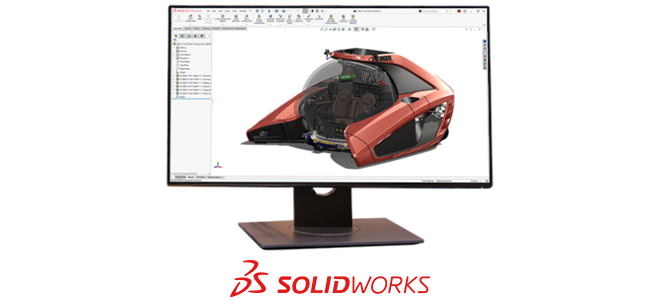 A vendor assembly example from the SOLIDWORKS Design product page. The image illustrates the application; it supplies no evidence about assembly performance.
Manufacturing changes the shopping list#
Fusion deserves an early look when you're both designing and machining. Autodesk packages CAD and CAM together, with additional manufacturing capabilities available through its broader offerings. The practical attraction is keeping model changes and machining work in one environment.
SOLIDWORKS has an integrated machining route as well. SOLIDWORKS CAM is an add-on with different packages; its Professional package adds capabilities including turning, assembly machining, and 3+2 programming. "SolidWorks doesn't have CAM" is a poor basis for a purchase.
Compare the operations your machine needs, the post-processor, and the entitlement that supplies them. Ask the supplier to demonstrate a representative setup, including workholding and a model revision. A CAM checkbox tells you remarkably little about the program that will reach the controller.
If your supplier does all the programming, native CAM may matter much less than delivering clean geometry and an unambiguous drawing.
Collaboration includes deciding which revision is released#
Fusion stores shared project data in cloud hubs with projects and secure folders. That's attractive for a team starting without an existing file-management system.
SOLIDWORKS Design also offers browser-based sharing and markup, CAD-aware cloud storage, and revision management through Cloud Services. This comparison is more involved than "Fusion has cloud, SolidWorks has folders."
Try a review with someone outside the design team. Have them identify the approved revision and leave a comment on a particular face. Then check how an engineer distinguishes that released part from tomorrow's experiment. A cloud folder doesn't make those decisions for you.
Platform and license terms can settle it immediately#
Autodesk supports Fusion on Windows and macOS. The desktop SOLIDWORKS system requirements list Windows for the CAD application. Don't mistake eDrawings for Mac or browser-based xDesign for the desktop SOLIDWORKS editor.
Fusion's personal-use version has restricted functionality and eligibility: Autodesk specifies personal, non-commercial projects, an annual revenue limit, and exclusions including primary employment and company environments. Don't budget a business workflow around the word "free."
SOLIDWORKS offers named-user and device licensing routes with different deployment arrangements; its product page also lists perpetual options through resellers. Compare the actual offers, including required add-ons, support, and collaboration. The cheapest headline price is often pricing a different job.
STEP and text-to-CAD belong in the same handoff test#
A STEP handoff normally transfers geometry, not the original Fusion timeline or SOLIDWORKS feature recipe. You can build further features around an imported shape, but that isn't the same as editing its original hole sketch.
SOLIDWORKS documents STEP import options for solids, surfaces, assembly structure, and units. Check those details in your receiving workflow instead of accepting a clean-looking viewport as proof that the import is finished.
This is also where text-to-CAD becomes relevant. If a generator supplies STEP, test the handoff exactly as you would a supplier's file: verify units and critical dimensions, inspect the bodies, then make a real revision. If it supplies native features or source code, keep that source alongside the exchange file. "Editable" needs a more useful definition than "the file opens."
I'd choose Fusion for a new design-and-machining workflow that benefits from its integrated environment. I'd choose SOLIDWORKS for work whose native deliverables and release process already depend on it. The deciding demonstration is the changed part, the corrected drawing, and the file the shop can actually use.
Related articles
CAD Workflows
Fusion 360 September 2026 update: sheet metal, PMI, and extensions
Fusion 360's September 2026 update adds Join by Bend, sheet metal edge tools, and PMI authoring. Join by Bend and the edge tools require Design Extension; PMI authoring requires Design or Manufacturing Extension.
Text-to-CAD
CADAgent for Fusion 360: open-source text-to-CAD inside Fusion
CADAgent (GitHub: er-fo/CADAgent, released March 2026) is a free, open-source Fusion 360 add-in that generates parametric CAD models from text prompts. It uses Anthropic's Claude API to create real Fusion 360 features with timeline history, not imported geometry. Requires your own API key.
Text-to-CAD
SolidWorks AURA AI: a first look
AURA is an AI companion in SolidWorks 2026 that accepts voice and text input for design tasks. It can look up commands, explain features, suggest next steps, and assist with design workflows. It shipped with SolidWorks 2026 FD01 (February 2026). Usefulness varies by task complexity.
Newsletter
Get new CAD articles in your inbox
Text-to-CAD guides, new tools, CAD comparisons, and practical tutorials.