

Onshape vs SOLIDWORKS in 2026: which workflow fits your team?
The cloud label no longer settles this CAD choice. Onshape is cloud-native; SOLIDWORKS Design adds cloud services around a Windows desktop workflow.
Quick answer
Choose Onshape for cloud-native CAD, branching, and live editing. Choose SOLIDWORKS Design for native Windows authoring, up to 30 days offline, and cloud revision tools in current plans.
Imagine it's 4:30 on a Friday. A supplier is waiting on a revised assembly, one engineer wants to mark it up from a Mac, and another is checking whether the drawing on the shop computer is cleared to go. At that point, a model that looks good in a demo is only half the job.
The Onshape vs SOLIDWORKS choice often gets reduced to cloud versus desktop. As of September 28, 2026, that summary is too blunt. Onshape is cloud-native. The current named-user SOLIDWORKS Design offers include cloud file and revision management, real-time collaboration, and browser markup around an installed Windows authoring app. The useful comparison is where engineers edit, how a revision becomes a release, and what still works when the network drops.
This covers Onshape Standard and Professional against SOLIDWORKS Design 2026 Standard, Professional, and Premium named-user offers. It does not cover Onshape Enterprise or Government, or every legacy and reseller SOLIDWORKS license. I have not tested performance or migrated a production assembly in both systems.
What the current plans actually include#
| Decision | Onshape | SOLIDWORKS Design 2026 |
|---|---|---|
| CAD authoring | Browser-based and cloud-native; plan for an internet connection. | Installed Windows desktop CAD with connected cloud services in current named-user offers. |
| Shared work | Multi-user editing, version history, branching, and merging. Release management and company-managed data depend on plan. | Browser sharing and markup, real-time collaboration tools, and secure cloud file and revision management. |
| Offline work | Model editing depends on the cloud service. | The current online offer has a Work Offline command for up to 30 consecutive days. |
| Plan boundary | Free documents are public and for non-commercial use. Standard adds private commercial storage; Professional adds company-managed data and release management. | Standard, Professional, and Premium include the listed Cloud Services. The tiers add different design, simulation, and manufacturing tools. |
Onshape's current plan matrix makes a big difference between Free, Standard, and Professional. Free documents are public and for non-commercial work. Standard adds private storage for commercial use. Professional adds company-managed data, release management, and advanced PDM. “Built-in PDM” does not mean every plan has the same release controls.
The current SOLIDWORKS Design offer page lists cloud sharing, markup, and secure file and revision management in its named-user Standard, Professional, and Premium plans. Higher tiers add particular tools such as rendering, tolerance analysis, routing, or simulation. Check the exact offer and reseller terms before you compare a seat to an Onshape plan.
SOLIDWORKS xDesign is a separate browser-based product. This comparison is with SOLIDWORKS Design, the installed CAD application, not an xDesign bundle. Dassault's product overview lays out that distinction, and its system requirements list Windows for the SOLIDWORKS client.
Version history and team editing are different questions#
Onshape's PDM overview describes automatic document history, branching and merging, and release management in the same service as CAD. That gives a team a direct way to explore a change on a branch while the main design remains available for other work. The team still has to decide which version is approved and who owns release, but the model history is part of the document rather than a pile of files around it.
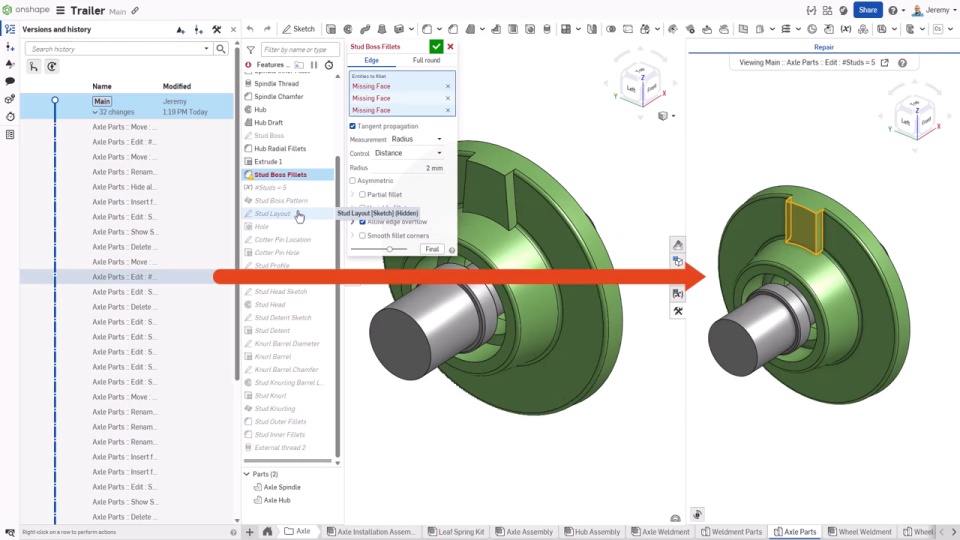
Frame from Onshape's version-control demo, published August 21, 2024. It illustrates the history panel; it is not a performance test. Source: Version Control for Hardware: Mastering Onshape's built-in PDM.
SOLIDWORKS Design has caught up on part of the cloud handoff. Its current offer page lists browser-based sharing and markup alongside CAD-aware file and revision management. That can be enough when the designer needs the desktop model and reviewers need a secure way to inspect and comment on a revision.
The word “collaboration” still covers different jobs. A review link, a shared file vault, and two people editing the same feature tree are not interchangeable. Onshape's plan page specifically lists multi-user editing. SOLIDWORKS describes real-time collaboration for sharing and marking up designs. If simultaneous authoring is a requirement, try the exact operation with two real seats before treating the feature lists as equivalent.
SOLIDWORKS' product overview is vendor demonstration footage, not a comparison test. Source: SOLIDWORKS Design.
A network outage is the honest test#
Onshape runs in the cloud and its comparison page says an internet connection is required. That makes connectivity a real design constraint for teams working at a plant, on a customer site, or somewhere the Wi-Fi falls over at exactly the wrong moment.
The current SOLIDWORKS Design online-offer FAQ says users can choose Work Offline and continue without a connection for up to 30 consecutive days. That is a practical difference, with a limit. Check how your team saves and synchronizes changes after reconnecting, and confirm that your license includes the same workflow. “Desktop” does not mean there is no cloud dependency in the license or release process.
Both products are shipping changes in 2026#
The latest entry on the Onshape changelog is version 1.221, released September 18, 2026. It adds a read-only document mode with an option to switch to editing for Professional and Enterprise users, plus version and history comparison for Feature Studio tabs. Onshape says its updates arrive every three weeks on the plans page.
The SOLIDWORKS What's New page labels its latest 2026 entry R2026x FD04, September 2026. It lists LEO assistance for sketch error analysis, assembly risk assessment, and drawing generation. The same page says SOLIDWORKS Design delivers five functional delivery and service pack releases during the year. These release notes describe product changes, not how either system will behave on your assembly.
Release cadence is useful when a feature you need is missing today. For everything else, I would spend more evaluation time on the data model, permissions, and release handoff than on counting update bullets.
Test the handoff before moving models#
Bring one assembly your team actually recognizes, not a cube. Include its drawing, a supplier's neutral file, and the steps that turn a working revision into an approved one. Then check the same tasks in each product:
- Have two people make related changes and review the version history. Confirm whether the edits can be parallel, how a branch returns to the main design, and what the approver sees.
- Share the model with someone who does not have a full design seat. Ask them to find the approved revision, leave a useful markup, and confirm the access controls.
- Turn off the network for a planned work session. Record which files remain editable, how the license behaves, and what needs attention when the connection returns.
- Export the file your supplier or shop expects. Reopen it in the receiving software and check units, assembly structure, properties, and drawing references.
If the job is moving history between CAD systems, read what Adam Migrations says it transfers. If you are comparing SOLIDWORKS with Autodesk Fusion as well, see our Fusion vs SOLIDWORKS comparison. The format still matters after the software decision; our CAD file-format guide explains what neutral files preserve.
Which one fits your team?#
Choose Onshape when browser-based authoring, multi-user editing, branches, and shared version history solve a problem your team has every week. For commercial work, check whether Standard's private documents are enough or whether Professional's company-managed data and release tools fit the way you approve parts.
Choose SOLIDWORKS Design when native SOLIDWORKS deliverables, established add-ins, Windows desktop authoring, or planned offline work matter more. Its current named-user offer has cloud collaboration and revision controls too, so include them in the evaluation rather than comparing against an old file-only picture of SOLIDWORKS.
The better pilot is the latest assembly that caused a handoff headache. Move it through one revision, one review, one release, and the file the shop expects. A CAD system earns its keep when that chain becomes boring.
Related articles
Comparisons
Fusion vs SolidWorks: choose for the work after the first model
Choose Autodesk Fusion when integrated design and machining, macOS support, and shared cloud projects fit your work. Choose desktop SOLIDWORKS Design when native SOLIDWORKS deliverables, established assembly workflows, and your team's drawing standards matter most.
Text-to-CAD
Text-to-CAD file formats: what comes out and whether it's usable
STEP (AP214/AP203) is the only text-to-CAD output format suitable for engineering work because it preserves B-Rep geometry with real edges and faces. STL and OBJ are mesh-only. glTF is for visualization. DXF is 2D only. Always export STEP if you need editable, machinable geometry.
Tools & News
Adam Migrations: moving CAD feature history between systems
Adam Migrations is an AI-assisted CAD-to-CAD tool that rebuilds parametric history, checks geometry step by step, and transfers model metadata, according to Adam. Its public page names seven CAD systems but leaves exact source-to-destination pairs, versions, and tolerances for a representative-model review.
Newsletter
Get new CAD articles in your inbox
Text-to-CAD guides, new tools, CAD comparisons, and practical tutorials.