

Onshape Replicate Annotations: what it copies and how to use it
Onshape's drawing tool can carry dimensions, tolerances, hole callouts, and external thread dimensions across repeated views. It saves repetitive placement; the engineer still owns the drawing that leaves the building.
Quick answer
Onshape Replicate Annotations copies existing dimensions, tolerances, and callouts from a drawing view or selected region to a similar view. The July 17, 2026 Onshape 1.218 update added hole callouts and external thread dimensions.
Picture a drawing with a row of patterned views, a supplier waiting for a PDF, and the same hole callout due in four places. Repeating the placement is dull; missing one is the sort of small mistake that can turn into a late email from the shop. Onshape's Replicate Annotations aims at that repetitive job.
The feature did not arrive yesterday. Onshape introduced it as a beta in release 1.213 on April 3, 2026. The July 17 release, version 1.218, expanded it to hole callouts and external thread dimensions across patterned or repetitive views. A September 24 Onshape article about MBD and machine learning gave the feature fresh context in a broader manufacturing-handoff story.
What Replicate Annotations copies#
Onshape's 1.213 release notes describe machine learning and probabilistic matching that transfers dimensions, tolerances, layout, and annotation placement from one view to another, including between separate drawings. The current help page sets a useful boundary: copy a view or region to another similar view with like geometry. The views do not have to be linked.
That is a useful distinction. The command carries existing annotations across; it is not a dimensioning strategy generator. The person doing the drawing still chooses what should be toleranced, which datums control inspection, and whether a copied note belongs on the target view.
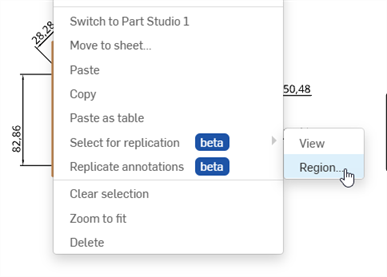
Onshape's help image shows the source-region selection. Source: Drawing view context menu help.
Onshape demonstrates the beta command in this official video.
How to use the workflow#
Onshape's help describes a source view or region and a second similar view as the destination:
- Right-click the source drawing view.
- Choose Select for replication, then View to copy its annotations or Region to select part of the view.
- Select the similar destination view and choose Replicate annotations from its context menu.
- Check the resulting dimensions, tolerance values, callouts, and placement against the target geometry.
Onshape says a notification reports how many annotations were successfully replicated. That is a count, not an engineering sign-off.
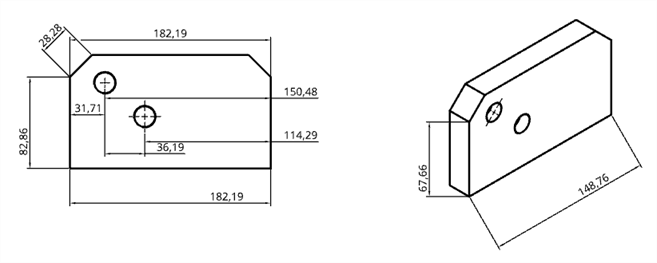
Onshape's documented example shows annotations carried between views. Source: View replication instructions.
The July 17 1.218 update is the change worth noticing if your drawings repeat holes or external threads. Onshape added support for those callouts across patterned and repetitive views, which is exactly where copying annotations can remove busywork without inventing design intent.
Keep the beta badge in view#
The April release called Replicate Annotations a beta, and Onshape's help screenshot, last updated September 24, still shows Beta beside the menu commands. Onshape says the tool examines the model at run time when invoked and does not train on customer data; its September manufacturing-handoff article repeats that customer data is not used for external model training. Those are vendor statements. If that assurance matters to your organization, run it through your normal security review.
MBD and annotation copying do different jobs#
Onshape's September 24 article groups integrated PDM, model-based definition (MBD), and machine-learning-assisted drawings in one manufacturing-handoff story. It describes using existing MBD data to suggest and create drawing views as deterministic. Replicate Annotations handles a separate task: matching and transferring existing annotations between similar views.
That distinction matters when “AI drawing creation” starts to sound broader than the release notes support. The feature gives you a narrower tool for repeated documentation. It does not choose a datum scheme or decide whether a tolerance matches the part's function. For the separate question of what MBD means for text-to-CAD drawings, see our text-to-CAD drawings article. For where automation earns its keep in a longer design process, see our CAD workflow guide.
Replicate Annotations is a sensible use of machine learning: a narrow, repetitive task with a result an engineer can inspect. Use it on similar views, check every copied annotation against its target, and let a person release the drawing.
Related articles
Text-to-CAD
Can text-to-CAD generate drawings?
No. Text-to-CAD tools generate 3D geometry only, not engineering drawings. 2D drawings require projection views, dimensioning schemes, GD&T callouts, surface finish specifications, notes, title blocks, and revision tracking. All of that must be created manually in your CAD tool's drawing environment after importing the AI-generated model.
Tutorials
AI CAD workflow: where AI fits in a real design process
AI fits into CAD workflows at two main stages: early concept geometry generation (text-to-CAD for first drafts) and documentation assistance (AI search, automated drawing notes). AI does not fit into detailed design, DFM review, tolerance specification, or assembly integration. The most productive approach: use AI for rough geometry, then switch to traditional CAD for everything else.
Text-to-CAD
Machine learning in CAD: beyond the hype
Machine learning has been used in CAD for years: feature recognition in CAM, mesh repair algorithms, and constraint solving optimization. Recent additions include generative design, text-to-CAD, AI assistants, and natural language commands. The most impactful ML applications in CAD are still the boring ones: classification, search, and defect detection, not geometry generation.
Newsletter
Get new CAD articles in your inbox
Text-to-CAD guides, new tools, CAD comparisons, and practical tutorials.